

You can check and pay traffic fines in Bahrain online using the Payment of Traffic Contraventions eService on the government portal, bahrain.bh. It has no conditions, needs no documents, and you pay by debit or credit card.
The service is run by the Ministry of Interior’s General Directorate of Traffic. Here is how it works, step by step.
What you need before you start
- The vehicle number and the owner’s identity number: CPR personal number, commercial registration number for a company car, or GCC ID. Or your driver details. Or the ticket number printed on the contravention ticket.
- A debit or credit card to pay online.
You do not need an eKey to use this service. You can search and pay without logging in.
Read More: How to Check Your Qatar Residence Permit (RP) Status Online
Step-by-step: check and pay your fine
Step 1: Open the eService
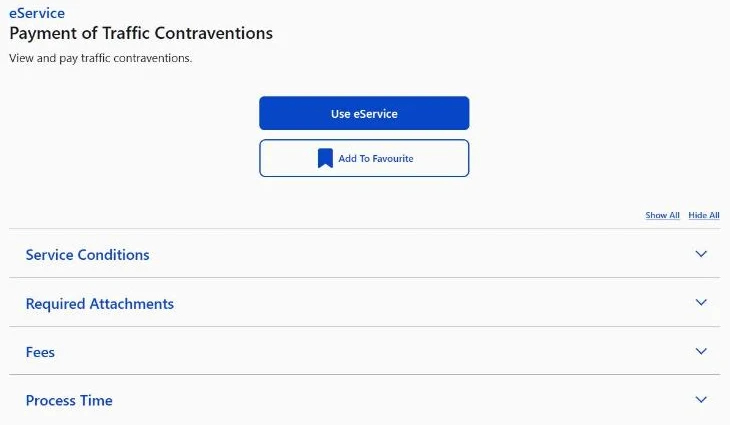
Go to the Bahrain eServices portal (services.bahrain.bh). Open eServices by Categories, then Traffic, and choose Payment of Traffic Contraventions. Click Use eService.
Step 2: Choose how to search
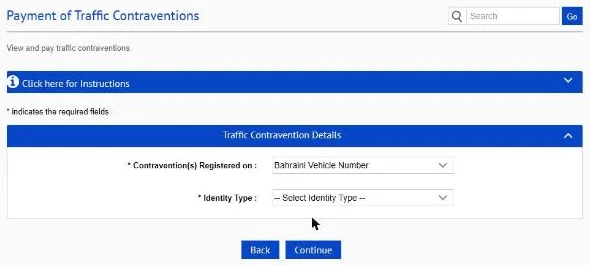
Under Contravention(s) Registered on, pick one of four options:
- Bahraini Vehicle Number
- GCC Vehicle Number
- Driver Details
- Ticket Number
Then click Continue.
Step 3: Enter the details
For a Bahraini vehicle, the form first asks for the owner’s Identity Type. Your options are Personal Number (CPR), Commercial Registration Number, GCC ID Number or Unit Number. Fill in the identity number and the vehicle details the form asks for, then click Continue.
Step 4: Check the fines and pay
Any unpaid contraventions are listed with the amount for each. Select the ones you want to settle and pay by card.
How much will it cost?
According to the service page, fees range from BHD 5 to BHD 300, depending on the contravention. The amount you see on screen is the one that counts.
How long does it take?
Processing takes one working day. So keep your payment receipt until the payment shows as cleared. Do not pay a second time just because the fine still appears for a few hours.
Paying for a GCC-plated car
Yes, you can. Choose GCC Vehicle Number in the Contravention(s) Registered on list and follow the form from there. This is handy if you drive a car registered in another GCC country, or are checking on behalf of a visiting friend or relative.
Other ways to check your fines
- Other bahrain.bh services: My Traffic Record and Traffic Due Payments sit in the same Traffic category.
- In person: at the General Directorate of Traffic.
Common Mistakes To Avoid
- Choosing the wrong search option. A GCC plate will not turn up under Bahraini Vehicle Number. Pick the option that matches the plate.
- Using the wrong identity type. Company cars are usually registered under a commercial registration number, not the manager’s CPR.
- Not saving the receipt. With one working day for processing, the receipt is your proof until the fine clears.
- Paying only part of the list. Check which contraventions you have ticked before you confirm.
These steps were checked on the official bahrain.bh portal on 28 October 2026. Government portals change from time to time, so if a screen looks different, follow the instructions on the official site. This guide is general information, not official advice.
Read More: Bahrain Compulsory Health Insurance For Expats Starts 31 October
FAQs
Can I pay Bahrain traffic fines without an eKey?
Yes. The Payment of Traffic Contraventions eService on bahrain.bh lets you search by vehicle number, driver details or ticket number and pay without logging in.
Can I pay a fine on a car with a GCC plate?
Yes. Choose GCC Vehicle Number in the “Contravention(s) Registered on” list and follow the form.
How much are traffic fines in Bahrain?
The service page lists fees from BHD 5 to BHD 300, depending on the type of contravention.
