

You can check your Qatar residence permit (RP) status online on the Ministry of Interior portal at portal.moi.gov.qa, and no login is needed. Use RP Application Tracking & Printing for a new permit, or RP Renewal Tracking for a renewal.
Which one you pick depends on one thing: whether you already hold a Qatar ID (QID). Here is how each route works.
What you need before you start
For a new residence permit
You need the visa number you entered Qatar on. You also need the ID number of your sponsor, their representative, or the company’s authorised signatory.
For a renewal
You need only your Qatar ID (QID) number.
Read More: How to Check Your Qatar Visa Status Online?
Step 1: Open Residency Permits inquiry
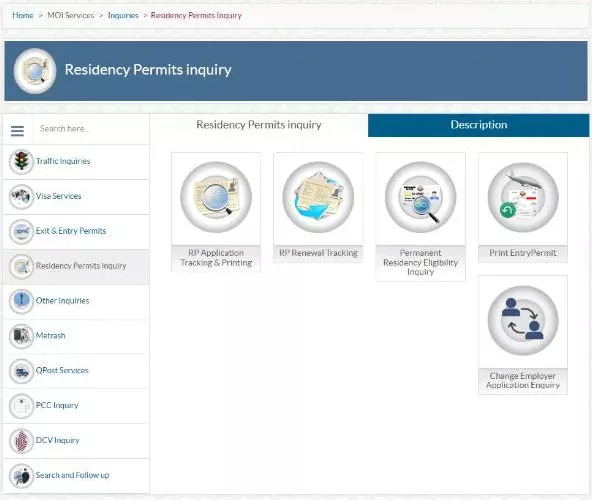
Go to the Ministry of Interior portal (portal.moi.gov.qa). Open MOI Services, then Inquiries, and choose Residency Permits inquiry.
You will see five services:
- RP Application Tracking & Printing
- RP Renewal Tracking
- Permanent Residency Eligibility Inquiry
- Print Entry Permit
- Change Employer Application Enquiry
Step 2: Track a new residence permit
If you are new to Qatar and your RP is still being issued, click RP Application Tracking & Printing. Enter the visa number and the ID number of the sponsor, representative or authorised signatory. Type the verification code and click Submit.
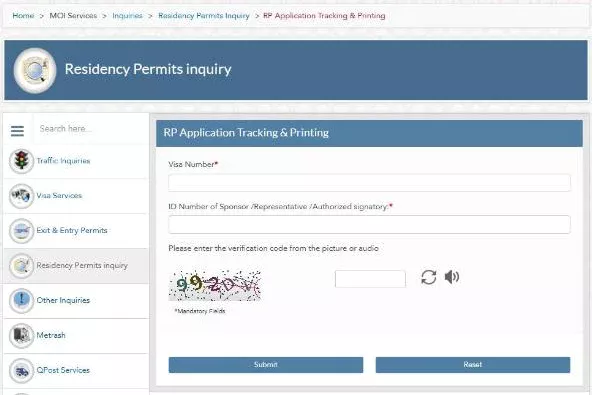
Once the permit has been issued, you can print it from the same service.
Step 3: Track a renewal
If your employer or sponsor has applied to renew your RP, click RP Renewal Tracking. Enter your QID number and the verification code, then click Submit.
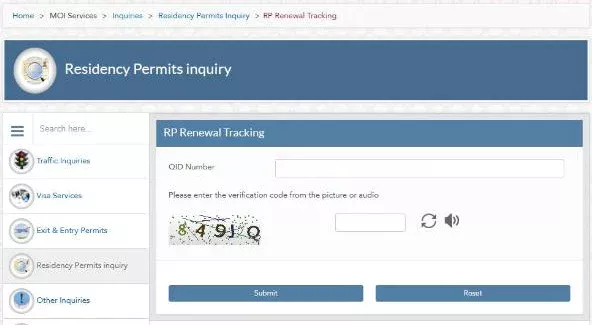
That is all. A renewal is tracked with your QID number only.
Other checks on the same page
- Change Employer Application Enquiry: follow an application to move to a new employer.
- Permanent Residency Eligibility Inquiry: see whether you meet the conditions for Qatar permanent residency.
- Print Entry Permit: print an entry permit that has been issued.
How to see when your RP expires
The expiry date is printed on your Qatar ID card. You can also see your residency details and expiry date in the Metrash app after logging in with your QID.
For a work-sponsored RP, your employer is responsible for renewing it. If the date is close, ask HR rather than waiting.
Common Mistakes
- Using the wrong service. A new permit is tracked with the visa number; a renewal with your QID. Mixing them up gives no result.
- Entering your own ID as the sponsor’s ID. For a new RP, the ID must belong to the sponsor, their representative or the authorised signatory.
- Mistyping the verification code. Check it carefully, and refresh it if it is hard to read.
- Assuming Metrash is required. The tracking services work without a login. Metrash is simply handy for seeing your details in one place.
Steps checked on the official Ministry of Interior portal (portal.moi.gov.qa) on 28 October 2026. Government portals change from time to time; if a screen looks different, follow the instructions on the official site. This guide is general information, not official advice.
Read More: How to Check and Pay Traffic Violations in Qatar Online
FAQs
How do I check my Qatar RP status with my QID?
Use RP Renewal Tracking under Residency Permits inquiry on portal.moi.gov.qa. Enter your QID number and the verification code, then click Submit.
I don’t have a QID yet. How do I check my new RP?
Use RP Application Tracking & Printing. Enter the visa number you entered Qatar on and the ID number of the sponsor, their representative or the authorised signatory.
Do I need Metrash to check my residence permit?
No. The tracking services on portal.moi.gov.qa work without a login. Metrash is useful for seeing your residency details and expiry date in one place.
