


You can check traffic violations in Qatar online without logging in. Open the Traffic Violations Inquiry page on the Ministry of Interior (MOI) payment gateway, search by plate number, Qatar ID or establishment ID, and pay any fines by card.
The whole process takes a few minutes on a phone. Here is how it works, step by step.
What you need before you start
To search by vehicle
You need the plate number, the vehicle type (private, transport and so on) and the owner’s Qatar ID number. If the car is registered to a company, use the company ID instead.
To search by person
You only need your Qatar ID (QID) number.
For company vehicles
Use the establishment ID.
To pay
Have a debit or credit card ready.
Read More: Qatar Signs Deals For Four Private Schools With 5,000 Seats
Step 1: Open Traffic Services on the MOI website
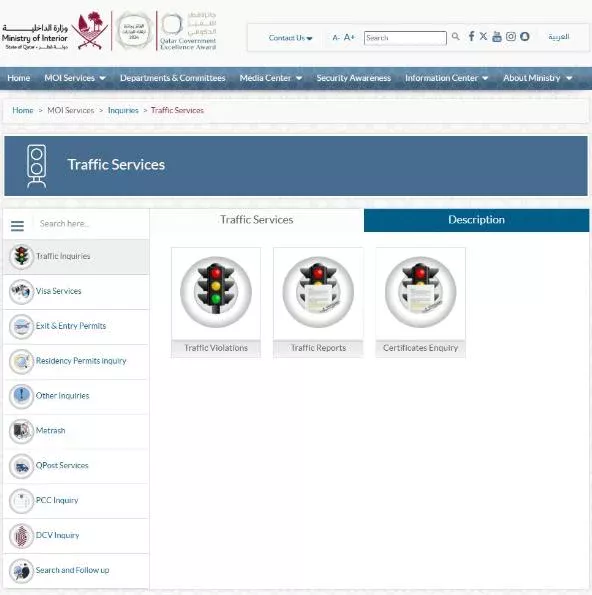
Go to the MOI portal at portal.moi.gov.qa. Open MOI Services, then Inquiries, then Traffic Inquiries. Choose Traffic Violations, the first service on the list.
Step 2: Choose Search Violations or Pay Violations
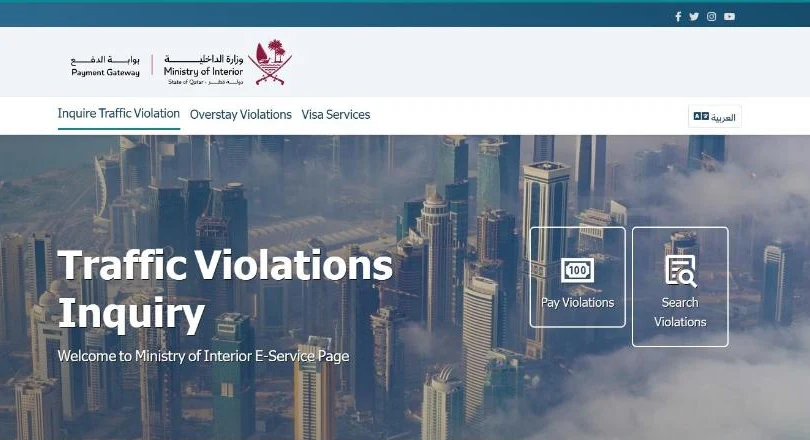
The link takes you to the MOI payment gateway (fees2.moi.gov.qa), on the Traffic Violations Inquiry page. Pick Search Violations to see what you owe. Pick Pay Violations if you already know you want to pay.
Step 3: Search by plate number
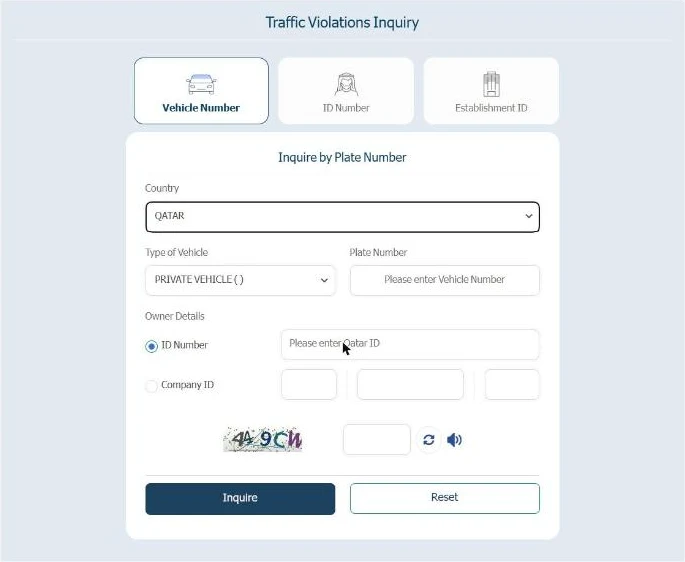
Under Vehicle Number, leave the country as Qatar. If the car is registered abroad, pick that country instead. Choose the vehicle type and type the plate number.
Under Owner Details, enter the owner’s Qatar ID. For a company car, select Company ID. Type the verification code from the picture and click Inquire.
Step 4: Or search by your Qatar ID
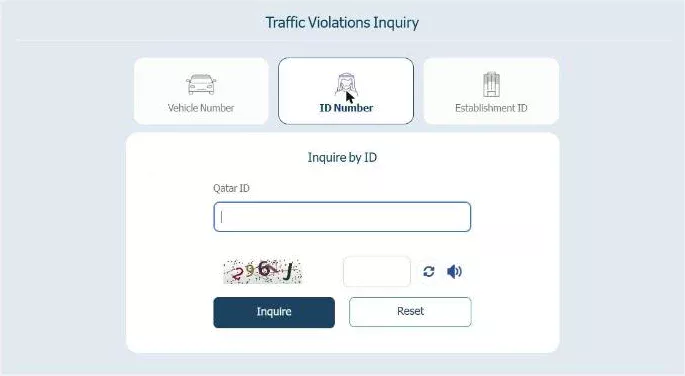
To see violations registered against you as a driver, click the ID Number tab. Enter your Qatar ID and the verification code, then click Inquire. Companies can do the same through the Establishment ID tab.
Step 5: Check the list and pay
If there are violations, each one is listed with its amount. Check the details, then pay by card. Keep the payment receipt. It can take a short time for the payment to show against the vehicle.
Other ways to check traffic violations in Qatar
- Metrash app: the MOI’s Metrash app shows violations on your vehicles and lets you pay them. You log in with your Qatar ID.
- In person: visit the General Directorate of Traffic or an MOI service centre.
Why it is worth checking
Speed and red-light cameras send no paper ticket. A violation can sit on your record without you knowing.
Unpaid violations can hold up other traffic services for the vehicle. Check before you renew your registration, sell the car or leave Qatar by road.
Common mistakes to avoid
- Wrong vehicle type. The plate search needs the right type. A wrong choice can return no result.
- Wrong ID. The plate search needs the owner’s Qatar ID or company ID, not necessarily yours. Use the owner’s details.
- Mistyped verification code. If the search fails, reload the code and try again.
- Not keeping the receipt. Save it in case the payment is slow to appear.
Steps checked on the official MOI websites (portal.moi.gov.qa and fees2.moi.gov.qa) on 28 October 2026. Government portals change from time to time. If a screen looks different, follow the instructions on the official site. This guide is general information, not official advice.
Read More: New Office Rules: Oman Bars Recruitment Office Fees For Workers From 2027
FAQs
Can I check traffic violations in Qatar without logging in?
Yes. The Traffic Violations Inquiry page on the MOI payment gateway works without a login. You need the plate number and owner’s ID, your Qatar ID, or the establishment ID, plus the verification code.
Can I check violations with just my Qatar ID?
Yes. Choose the ID Number tab, enter your Qatar ID and the verification code, then click Inquire.
Can I check violations on a car registered outside Qatar?
The plate number search has a country field. You can choose the country where the car is registered instead of Qatar.
